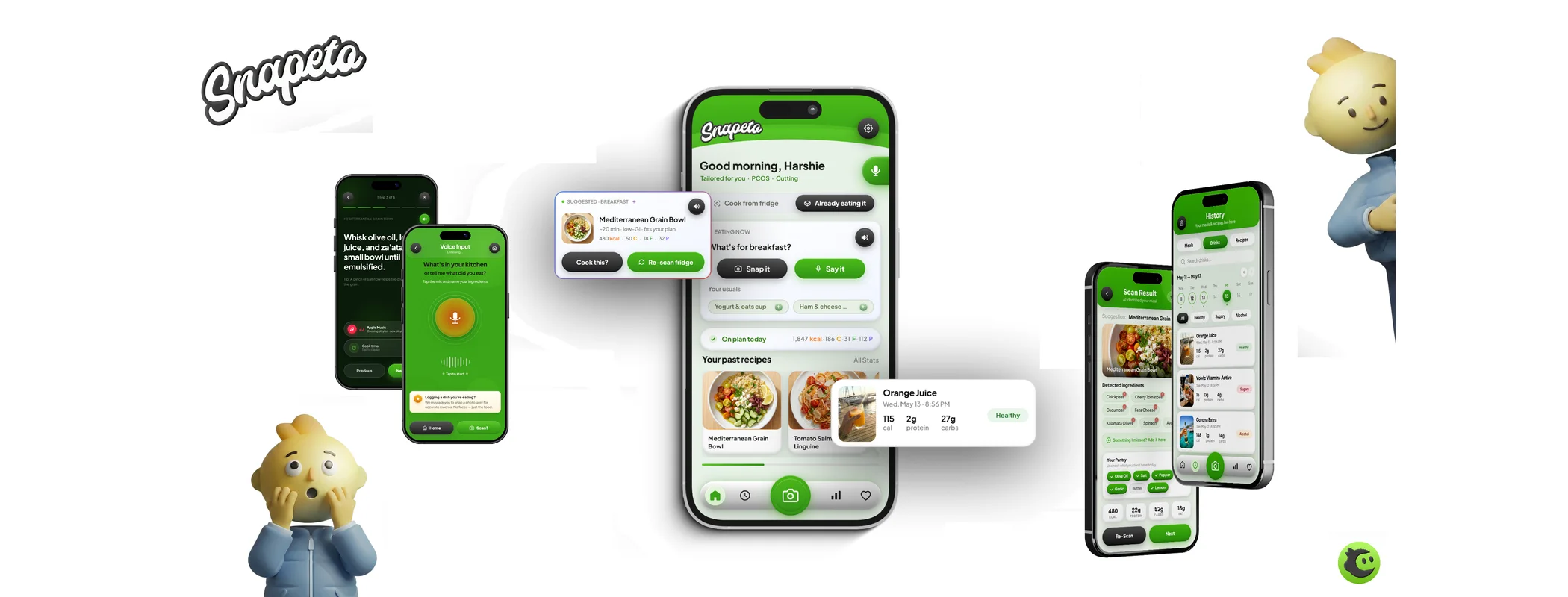
Snapeto is our AI food app: photograph your fridge, get tonight's plan. This teardown covers the design decisions that made it Ai native rather than a recipe database with a chatbot, including the ones that cost us rebuilds. Snapeto is a Dinimiciuil Labs product, so read this as a builder's diary, not a review.
Most AI app case studies are written by marketing teams after the fact. This one is written by the people who pushed the commits. We'll walk the product top to bottom: the capability test that started it, the interface decisions that followed, and the unglamorous engineering that keeps it standing.
The capability test that defined the product
Snapeto exists because of one question: can a vision model reliably turn a photo of a real fridge into a usable ingredient list? Not a staged fridge. A real one, with sauce jars facing backwards and something unidentifiable in a drawer.
The answer shaped everything. Vision models are strong on visible, distinct items and weaker on occluded ones and quantities. So the product promise became "a fast, mostly right starting point you can correct in seconds", never "a perfect inventory". That one framing decision dissolved a whole class of failure: when the model misses your mustard, it's a one-tap fix, not a broken promise.
Why the camera button owns the home screen
Open Snapeto and the biggest interactive element is the camera button. That's the Ai native thesis expressed as layout: the core loop is photo to ingredients to plan, so the trigger for that loop is the home screen's centre of gravity. Browsing recipes, the thing a traditional food app leads with, is secondary navigation.
We also made that button physically satisfying: it depresses inward like a real shutter, with the outer ring staying still. Tactile feedback on the single most used control isn't decoration. It's the difference between an app that feels engineered and one that feels generated.
Context over prompts: the time aware layer
Nobody should have to type "what should I eat tonight" into a food app. The app knows it's 18:40. So Snapeto's greeting, suggestions and meal prompts shift across the day: breakfast logic in the morning, a cook-or-eat decision in the evening. The user supplies a photo and a tap; the app supplies the context the model needs.
This is the cheapest Ai native trick available to any product team: mine your app state for context before asking the user for anything. Time, history, pantry contents, past corrections. Every piece of context gathered automatically is a prompt the user never has to write.
The pantry: structured for the model, not the database
Snapeto's pantry uses five universal categories: dairy, vegetables, protein, grains, sauces. Not because food taxonomy stops at five, but because that's the granularity the model's output is most reliable at, and the granularity a human can scan in two seconds while hungry. The data model serves the loop, not the other way round.
The engineering nobody sees
- Confidence handling: low confidence ingredient guesses render as suggestions to confirm, not facts. The UI grammar makes the model's certainty visible without a single percentage on screen
- Cost control: identical photos never hit the model twice, and each session has a cost shape we track. Inference is a unit cost someone owns, which is question four on our vendor checklist
- Failure paths: if vision fails entirely (it happens), the manual add flow is two taps away and doesn't feel like a punishment
- Web first: Snapeto ships as an installable web app, with the native build to follow. One codebase while the product is still learning what it is
What we'd tell anyone building an Ai native product
- Run the capability test before the design sprint. Real inputs, real lighting, real mess
- Promise the model's actual reliability, not its best demo. "Mostly right, instantly correctable" is a sellable promise
- Spend your interface budget on the core loop's trigger. Make it unmissable and make it feel good
- Harvest context from app state before asking the user to type anything
- Design the failure paths with the same care as the happy path, because your users will meet them
Frequently asked questions
What is Snapeto?
Snapeto is an Ai native recipe and food planning app built by Dinimiciuil Labs (us). Its core loop: photograph your fridge, the model identifies ingredients, and the app plans what to cook. It runs as an installable web app, with native versions planned.
What makes Snapeto Ai native rather than AI added?
The vision model runs the core loop. Remove it and the product stops making sense, which is the definitional test. The interface, pantry structure and time aware prompts were all designed around measured model capabilities, not retrofitted.
What stack is Snapeto built on?
A Next.js web app and an Expo mobile build over a FastAPI backend that orchestrates the models. The same end to end approach we use for client builds: one team owns design, build and deployment.
Why ship as a web app before native?
One codebase while the product iterates fastest, instant updates without store review, and installability covers most of the native feel. The native build follows once the product's shape stabilises, reusing the same backend.
© 2026 Dinimiciuil Labs. All rights reserved. Written on the build floor in Dublin. You are welcome to quote a short excerpt with a link back; please do not republish the full article without permission.